From Static Websites to AWS Three-Tier Architecture: My Journey into DevOps

Building, troubleshooting, securing, and verifying AWS workloads — from S3 and EC2 to a three-tier application and an AI-assisted AWS security audit.
A working application isn't necessarily a working system.
That became one of the biggest lessons from my DevOps Micro Internship journey.
I started with a simple static website on Amazon S3. I then moved into Linux and EC2 deployments, introduced private Amazon RDS, explored high availability with load balancing and Auto Scaling, and eventually designed and deployed a three-tier Book Review application across two Availability Zones.
Alongside the infrastructure work, I built a read-only AWS security and cost audit workflow using Bash, AWS CLI, and Claude Code, where AI helped analyze findings while infrastructure changes remained under human control.
The progression was:
S3 → EC2/Nginx → Private RDS → High Availability → Three-Tier Architecture → AI-Assisted AWS Audit
What made the journey valuable wasn't simply getting each deployment to work.
It was learning how to investigate failures, understand the architecture, make controlled changes, and verify the result.
Starting with Amazon S3
My first AWS deployment was a static personal portfolio website using Amazon S3 Static Website Hosting.
The workflow was:
Website files → S3 bucket → Static Website Endpoint → Browser
I created a globally unique S3 bucket, uploaded the website contents with index.html at the bucket root, enabled Static Website Hosting, configured public read access, and verified the site through the S3 website endpoint.
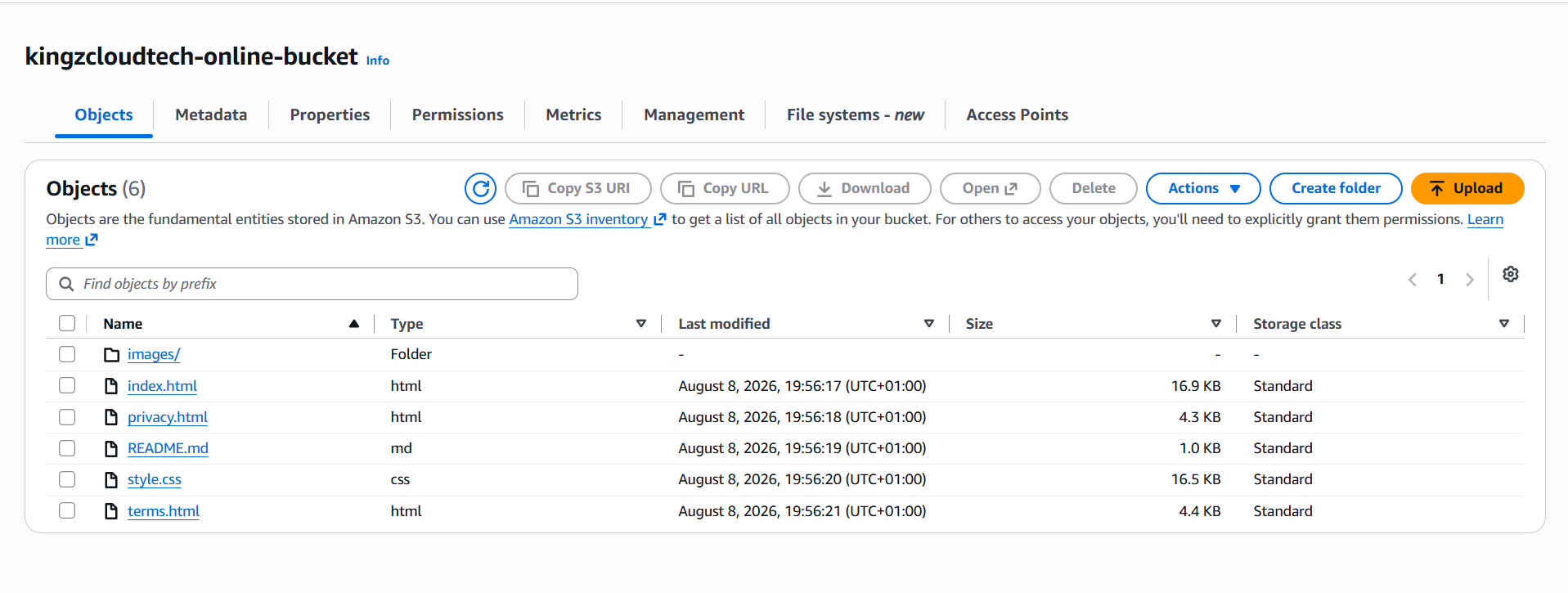
Figure 1: Amazon S3 bucket containing the deployed portfolio website files.
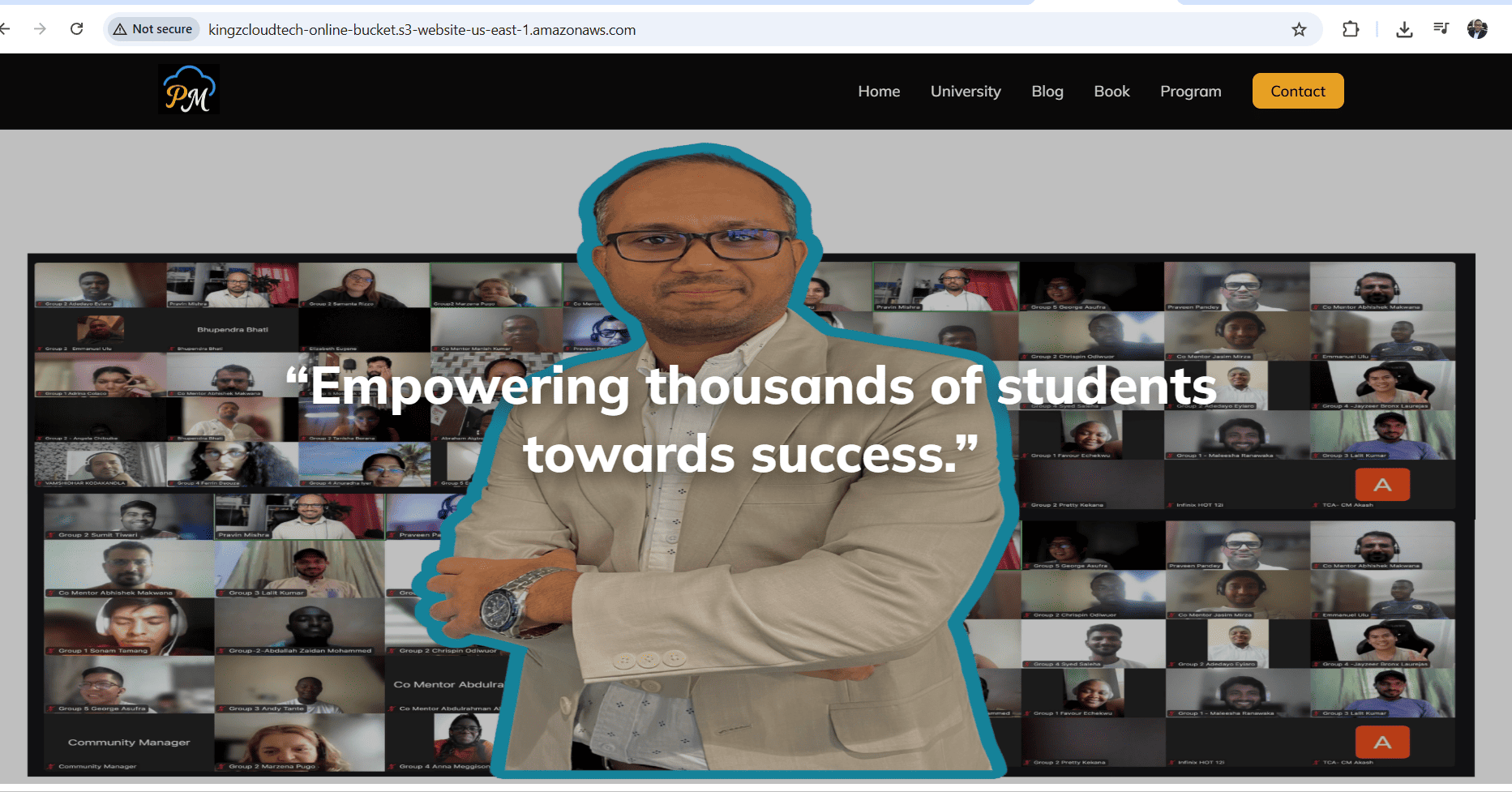
Figure 2: Personal portfolio website successfully deployed and served through the Amazon S3 website endpoint.
I also made a small change to the homepage, re-uploaded the updated file, and confirmed that the change appeared on the live website.
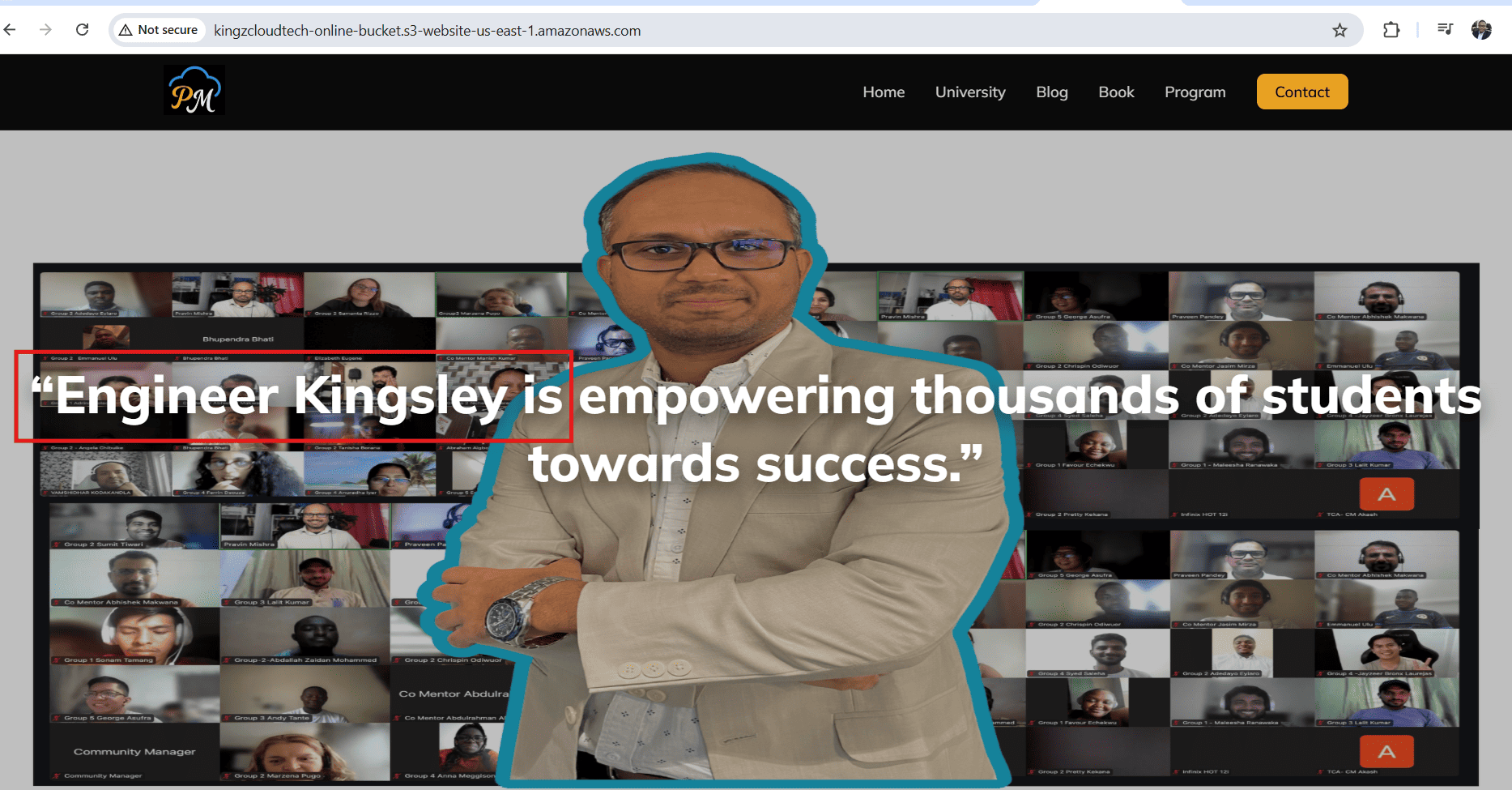
Figure 3: Updated portfolio website successfully redeployed to Amazon S3, with the modified homepage text visible through the S3 website endpoint.
This introduced an important habit that stayed with me:
A deployment isn't complete until the result has been validated.
Moving to EC2 and Nginx
I then deployed the Mini Finance static website on an AWS EC2 Linux instance.
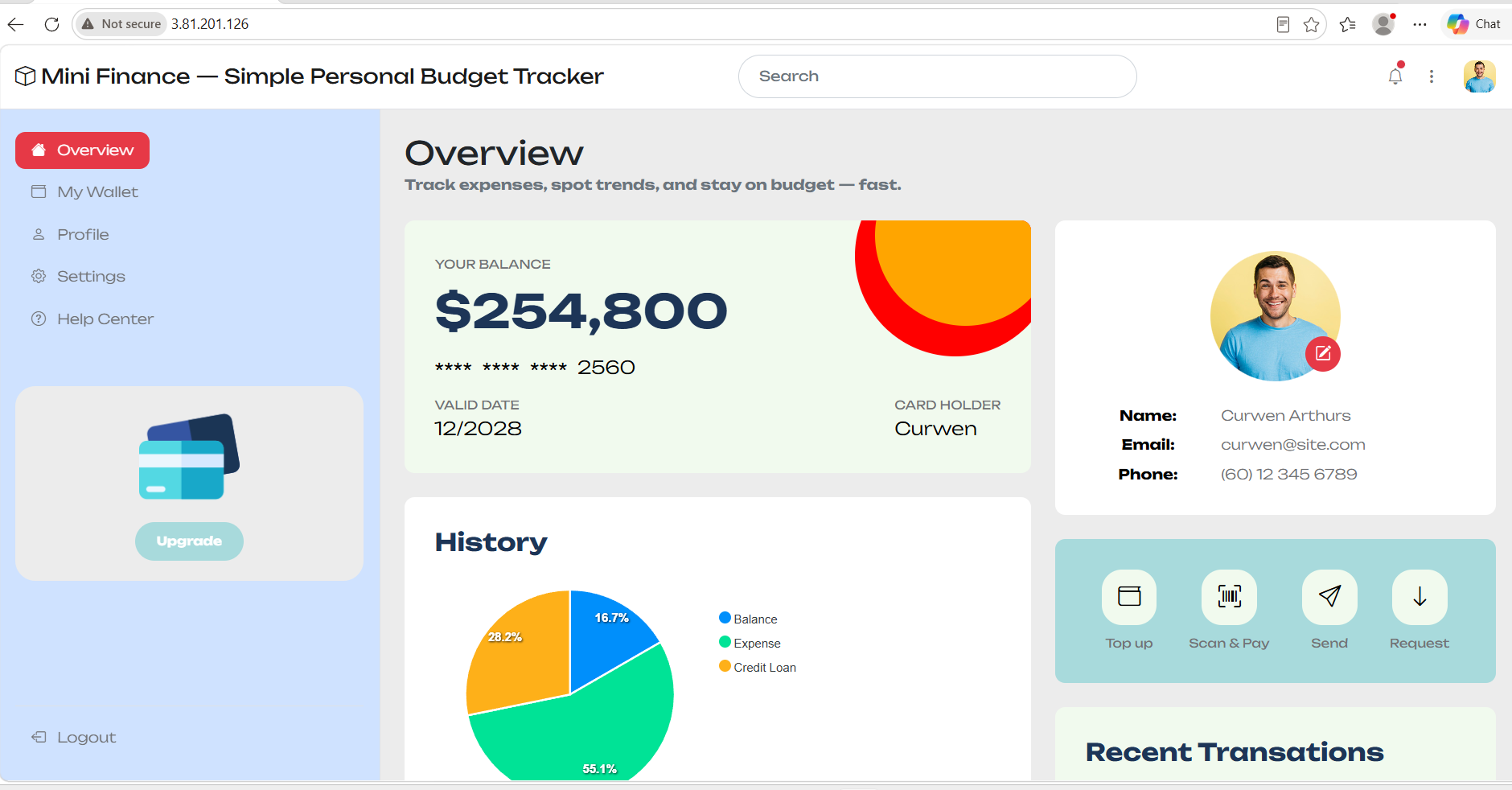
Figure 4: Mini Finance website successfully deployed on an AWS EC2 instance and accessed through the instance's public IP address.
The workflow became:
Internet → EC2 → Nginx → Website
I launched the instance in a public subnet, configured HTTP and SSH access through a Security Group, connected via SSH, installed Nginx, cloned the website source from GitHub, copied the files to the web server root, and verified the application from the EC2 public IP.
This gave me practical experience with:
EC2
Linux
SSH
Security Groups
Nginx
Git/GitHub
Public networking
Manual deployment
The next step was separating the application from its database.
Introducing Private RDS
With the EpicBook deployment, I moved beyond a simple web server and introduced Amazon RDS for MySQL.
The architecture became:
Browser → Nginx → Node.js → Private RDS MySQL
The application ran on Ubuntu EC2 while the database remained in private networking.
I used Security Groups to control communication between the application and database layers and configured Nginx to reverse-proxy requests to the Node.js application.
I validated the deployment with application and database checks, including commands such as:
curl http://<EC2_PUBLIC_IP>/api/
mysql -h <RDS_ENDPOINT> -u -p -e "SELECT 1;"
This was an important change in how I approached infrastructure.
I was no longer thinking only about individual AWS services.
I was starting to think about:
traffic flow, network boundaries, dependencies, permissions, and failure points.
Designing for Failure
The next stage introduced high availability.
I worked with an architecture using:
A custom VPC
Multiple Availability Zones
Public and private subnets
Application Load Balancer
Auto Scaling Group
NAT Gateway
Multi-AZ RDS
Security Groups
The ALB provided a stable public entry point, while the Auto Scaling Group maintained multiple instances across Availability Zones.
But configuring multiple Availability Zones isn't enough to prove high availability.
I tested failure scenarios and verified that the application could continue serving traffic while the infrastructure recovered.
One important test involved terminating a web-tier instance and observing the Auto Scaling Group launch a replacement and register it with the load balancer.
That taught me an important principle:
Don't just configure resilience. Test it.
The Capstone: A Three-Tier Book Review Application
The capstone brought these concepts together.
I designed and deployed a production-style three-tier Book Review application on AWS, spanning two Availability Zones.
The architecture separated the system into three layers.
Presentation Tier
Next.js frontend
Ubuntu EC2
Nginx
Public Application Load Balancer
Two public Web Tier subnets
Business Tier
Node.js/Express backend
Private EC2 instances
Internal Application Load Balancer
Two private App Tier subnets
Data Tier
Amazon RDS for MySQL
Two private Database Tier subnets
Multi-AZ deployment
Read replica
SSL-secured database connectivity
The VPC used:
10.0.0.0/16
Final traffic flow
User → Public ALB → Web EC2/Nginx → Internal ALB → App EC2/Node.js → RDS MySQL
Architecture diagram
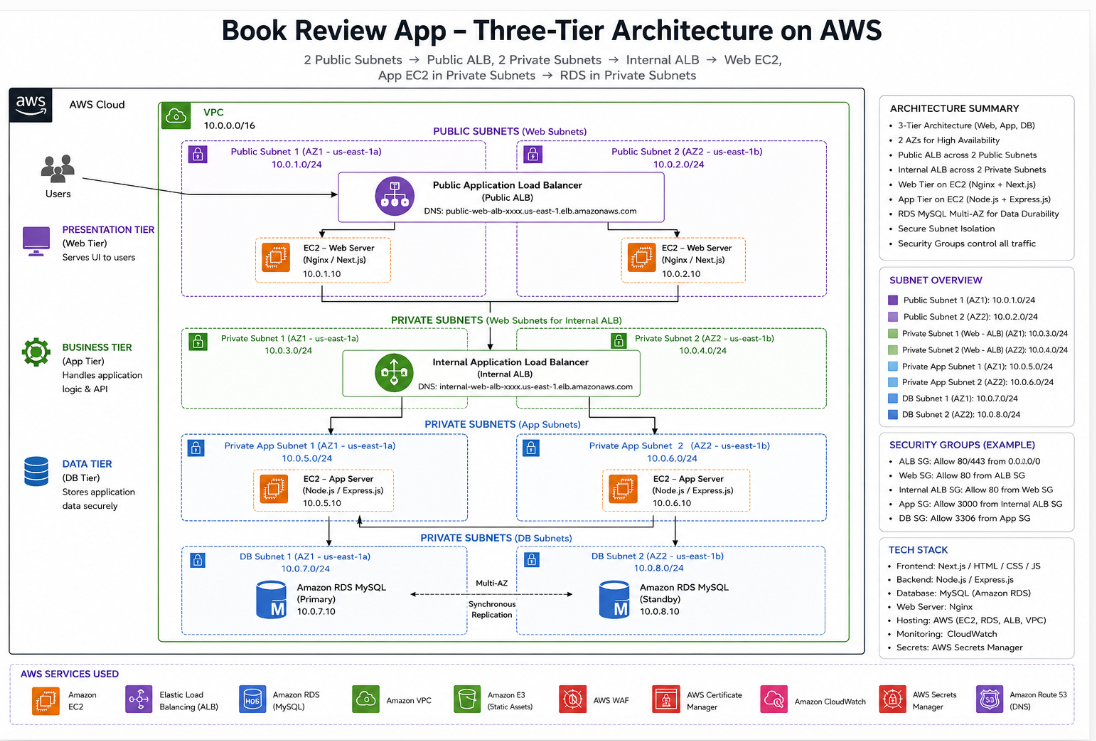
Figure 5: Final AWS architecture showing the Web, App, and Database tiers, public and internal Application Load Balancers, private networking, and Multi-AZ database infrastructure.
The important part of the design wasn't simply having many AWS services.
It was controlling who could communicate with whom.
The App Tier Security Group allowed backend traffic on port 3001 from the Web Tier, while the Database Tier Security Group allowed MySQL traffic on port 3306 from the App Tier.
The App Tier and Database Tier were kept private rather than directly exposed to the internet.
This created a tiered trust model:
Web Tier → App Tier → Database Tier
rather than exposing the application and database directly to the public internet.
When the Architecture Broke
This was where the capstone became much more than a deployment exercise.
Several real problems appeared during implementation.
RDS: Unknown Database
The application returned:
Unknown database 'book-review-db'
I traced the application configuration and found a mismatch between the database name expected by the application and the database that had been created.
I corrected the configuration to:
book_review_db
and restored database connectivity.
Lesson: A database connection problem isn't always a networking problem. Configuration consistency matters too.
MySQL SSL Failure
I encountered:
SSL_CTX_set_default_verify_paths failed
I traced the problem to the RDS SSL certificate configuration.
The solution was to configure the AWS RDS CA bundle, including:
global-bundle.pem
After updating the SSL configuration, I restored secure database connectivity.
Lesson: Secure connectivity depends on more than opening the correct port. Certificate validation and client configuration matter too.
Node.js Port Conflict
The Node.js backend reported:
EADDRINUSE
Port 3001 was already occupied.
Rather than simply changing ports, I investigated which process was using it:
ss -ltnp | grep :3001
lsof -i :3001
I identified the process causing the conflict, resolved it, and configured PM2 for application process management.
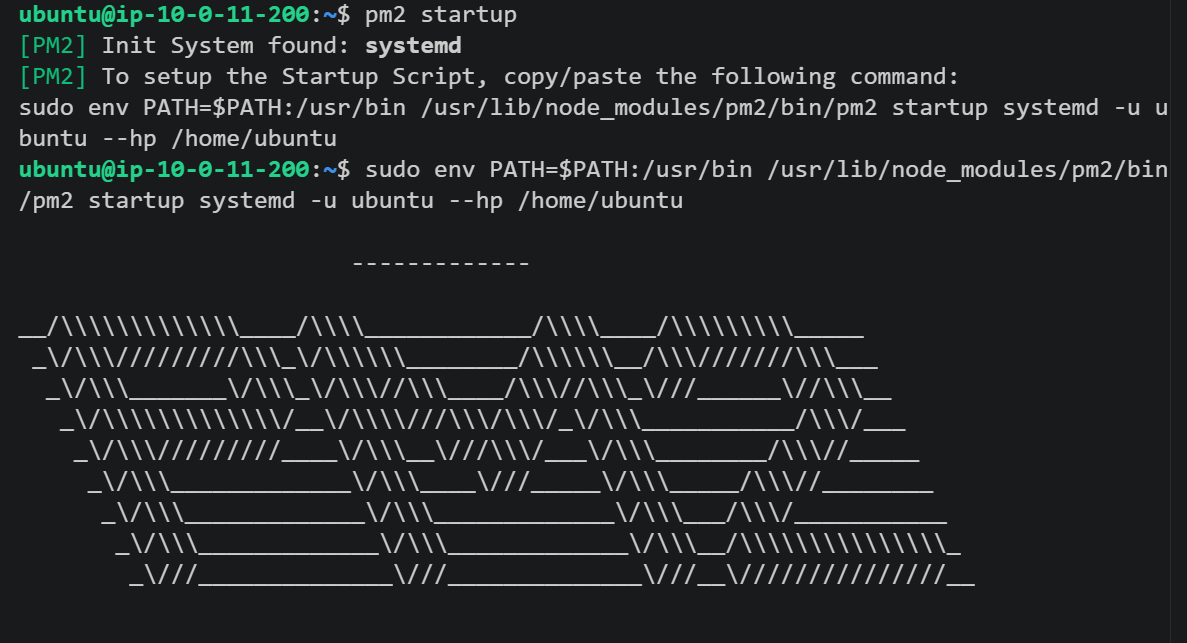
Figure 6: PM2 Startup Script Configuration for Systemd.
Lesson: Linux troubleshooting starts with evidence rather than guesswork.
ALB Returned 503
The Application Load Balancer returned:
503 Service Temporarily Unavailable
I investigated the target group and discovered that the Web Tier instance had not been correctly registered.
After correcting the target configuration, the target became healthy and the application could be reached through the ALB.
Lesson: An ALB 503 doesn't automatically mean the application itself is broken. The load balancer, target group, health check, instance, port, and application listener all need to be considered.
The Frontend Loaded — But the Books Didn't
This was one of the more interesting application-level problems.
The frontend loaded successfully, but the books were not appearing.
I traced the API request and discovered that the frontend was generating:
/api/api/books
instead of:
/api/books
I corrected the frontend configuration, rebuilt the Next.js application, restarted the application, and verified the API path.
Lesson: Not every cloud failure is an AWS failure. Sometimes the infrastructure is healthy and the problem is in the application configuration.
Adding AI to the Infrastructure Workflow
After spending time troubleshooting infrastructure manually, I wanted to explore another part of the DevOps workflow:
How can AI help me inspect AWS infrastructure without giving it unrestricted control?
That led me to build an AI-Assisted AWS Security and Cost Audit workflow.
The workflow combines:
Bash + AWS CLI + Claude Code
The design principle was:
Gather → Analyze → Human Act → Verify
Building a Read-Only AWS Audit
I created a Bash-based audit script that uses read-only AWS CLI commands to inspect infrastructure for security and potential cost-related risks.
The audit checks areas including:
SSH exposure to 0.0.0.0/0
MySQL exposure to 0.0.0.0/0
Public RDS accessibility
S3 public-access configuration
EBS encryption
The important design decision was that the audit itself does not modify AWS resources.
It gathers evidence first.
I then created a reusable Claude Code /aws-audit skill that can:
Review the audit output.
Identify WARN and FAIL findings.
Explain the evidence.
Analyze the security or cost implications.
Recommend remediation.
Provide verification steps.
Stop before modifying the infrastructure.
That separation between analysis and remediation was deliberate.
A Real Security Finding
The audit caught a real issue in my AWS environment:
SSH port 22 was open to 0.0.0.0/0.
That meant SSH access was exposed to the entire internet.
Instead of allowing the AI to automatically change the Security Group, I followed the workflow.
Gather
The read-only audit collected the Security Group configuration.
Analyze
Claude Code analyzed the finding and explained the security risk.
Human Act
I reviewed the recommendation and manually changed the Security Group to restrict SSH access to my IP address.
Verify
I ran the audit again to confirm the change.
The finding changed from:
FAIL → PASS
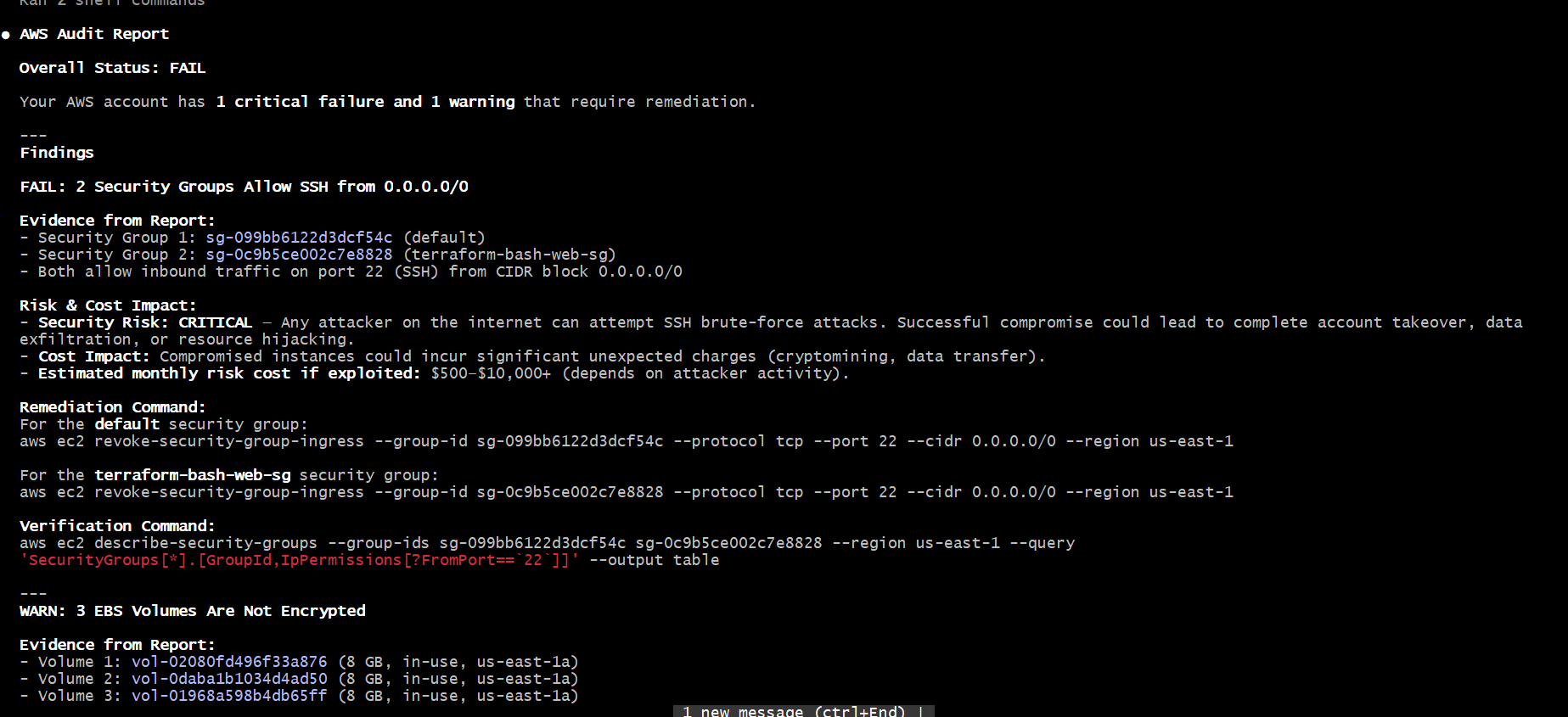
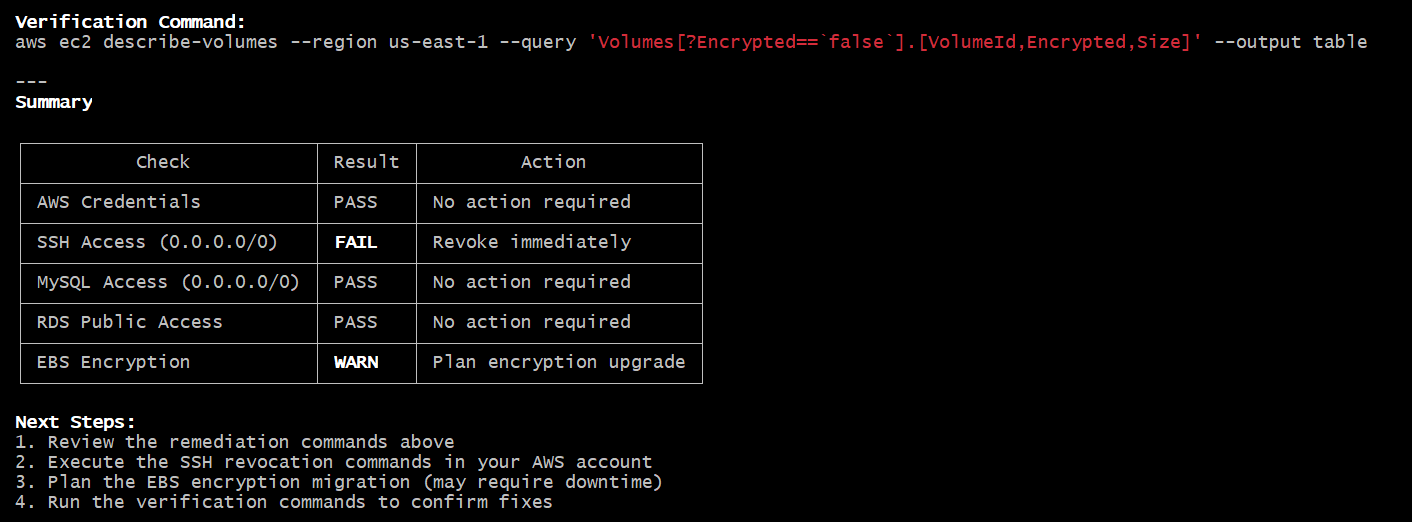
This reinforced an important principle for me:
AI-assisted infrastructure doesn't have to mean AI-controlled infrastructure.
AI can accelerate evidence analysis and remediation planning while the engineer remains responsible for approving changes to live infrastructure.
What I Learned About DevOps
Looking back, the technologies changed as the projects became more complex:
S3 → EC2 → RDS → ALB → Auto Scaling → Multi-AZ → Three-Tier Architecture → AI-Assisted Audit
But the bigger progression was in my problem-solving approach.
I moved from asking:
"How do I deploy this?"
to asking:
"How is this system supposed to work, what evidence do I have, where is the failure, what is the safest fix, and how can I verify it?"
That shift is important.
Because DevOps isn't just about knowing AWS services.
It's about understanding systems.
The Skills I'm Building
Through these projects, I've gained hands-on experience with:
AWS: VPC • EC2 • S3 • ALB • Auto Scaling • RDS • Security Groups • NAT Gateway • Internet Gateway
Application: Next.js • Node.js • Express • MySQL • Nginx
DevOps/Linux: Ubuntu • Bash • AWS CLI • Git/GitHub • PM2 • curl • ss • lsof
AI-Assisted Engineering: Claude Code • Read-only infrastructure auditing • Evidence-based analysis • Human-approved remediation • Reverification
I'm continuing to deepen my skills in:
Terraform • Docker • Kubernetes • CI/CD • Cloud Security • Infrastructure Automation
The Biggest Lesson
The biggest lesson from this journey is that DevOps isn't just deployment.
It's the ability to:
Build → Observe → Troubleshoot → Secure → Automate → Verify
A system that works once is useful.
A system that can be understood, secured, tested, recovered, and verified is much more valuable.
AI can make parts of that process faster, but it doesn't remove the need for engineering judgment.
In my AWS audit workflow, AI analyzed evidence and recommended a remediation.
I remained responsible for the change.
Then I verified the result.
That is the approach I want to continue developing as I grow into Cloud and DevOps Engineering.
Build it. Break it. Understand it. Secure it. Verify it. 🚀
Final Thoughts
This journey started with a simple static website.
It progressed into Linux and EC2 deployments, private database connectivity, load balancing and high availability, and eventually a multi-tier AWS architecture with separate Web, App, and Database tiers.
Along the way, I learned that the most valuable part of infrastructure work often begins after something goes wrong.
A 503 is evidence.
An EADDRINUSE error is evidence.
An SSL failure is evidence.
An overly permissive Security Group is evidence.
The engineer's job is to investigate that evidence, understand the system, make a controlled change, and verify the outcome.
That's the mindset I'm taking forward as I continue building my career in Cloud and DevOps Engineering.
About the DMI Program
This work is part of the DevOps Micro Internship (DMI) with Agentic AI — Cohort 3 — by Pravin Mishra.
My graded progress is publicly available:
https://dmi.pravinmishra.com/s/solutionkingz-glitch.html
Interested in starting your own DevOps journey?
https://dmi.pravinmishra.com/?utm\_source=student&utm\_medium=ps-linkedin&utm\_campaign=cohort3
Build it. Break it. Understand it. Secure it. Verify it.
About the author
- Hi, I'm Kingsley, a Cloud & DevOps Engineer focused on building practical skills in AWS, Azure, infrastructure automation, and modern DevOps practices. I work on hands-on projects involving AWS, Azure, Linux, Git, Docker, Terraform, Bash, and CI/CD, using these technologies to build, automate, deploy, monitor, and troubleshoot cloud infrastructure. This blog documents my technical projects, engineering challenges, solutions, and lessons learned. I share practical implementations and real-world problem-solving experiences across Cloud and DevOps, with the goal of continuously improving and contributing to reliable, automated infrastructure.
Comments
Join the discussionNo comments yet. Be the first to comment.