Azure DevOps Projects: VM Deployment, Three-Tier Architecture & AI Security Audit

Introduction
My recent Azure projects have taken me through a progression from basic cloud infrastructure and application deployment to production-style architecture, troubleshooting, security auditing, and AI-assisted remediation.
What started with learning how Azure resources work progressed into deploying React and Node.js applications on Ubuntu Virtual Machines, configuring Nginx, integrating Azure Database for MySQL, designing public and private network segments, implementing a three-tier Book Review application, and finally building an AI-assisted Azure security posture audit using Azure CLI, Bash, and Claude Code.
These projects reinforced an important lesson:
A cloud deployment is not successful simply because the application works. It should also be appropriately secured, maintainable, testable, and verifiable with evidence.
This article documents that progression and the key DevOps lessons I gained along the way.
Starting with Azure Infrastructure
My Azure work began with understanding the fundamental building blocks required to deploy applications in the cloud.
Some of the core Azure services and concepts I worked with included:
Azure Resource Groups Azure Virtual Networks (VNet) Subnets Network Security Groups (NSGs) Azure Virtual Machines Public IP addresses Azure Storage Azure Load Balancer Azure Database for MySQL Flexible Server
One of the first lessons I learned was that these resources are not isolated components. They work together to form an application environment.
A simplified architecture looks like this:
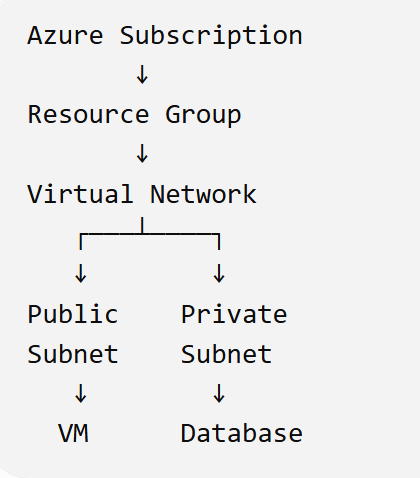
Understanding these relationships became increasingly important as I progressed toward more complex architectures.
Deploying a React Application on an Azure Ubuntu VM
One of my early projects involved deploying a React single-page application on an Ubuntu Azure Virtual Machine and serving it through Nginx.
The basic architecture was:
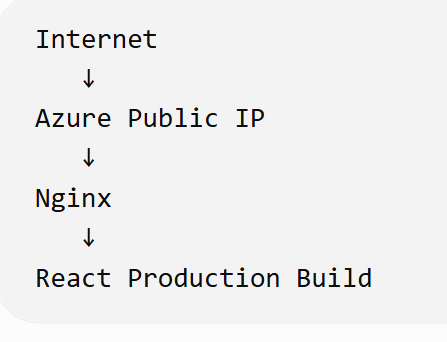
This project gave me hands-on experience with:
Ubuntu server administration
Installing and configuring software
Building a React application
Nginx configuration
Linux file permissions
System service management
HTTP connectivity testing
Troubleshooting deployment issues
A Real Nginx Permission Problem
One of the issues I encountered was an Nginx permission error while trying to serve the React production build from a user's home directory.
The application files existed, but Nginx could not access them because it could not traverse the required directories.
Instead of unnecessarily changing the application, I investigated the Linux permissions, identified the directory access issue, applied the appropriate permission change, and verified the result via HTTP.
This reinforced an important DevOps principle:
Troubleshooting should begin with evidence, not assumptions.
Deploying the EpicBook Web Application
The next stage was more involved: deploying The EpicBook, a Node.js/Express web application.
This moved the architecture beyond a static frontend:
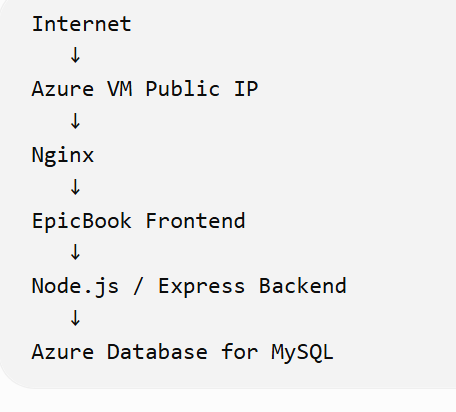
The project introduced me to additional technologies and concepts:
Node.js
Express.js
Nginx
MySQL
Azure Database for MySQL
Database connectivity
Linux process management
Application troubleshooting
Network security
The application source used for the deployment was:
pravinmishraaws/theepicbook
Connecting the Application to Azure Database for MySQL
Deploying the application was only part of the task.
The backend also needed reliable connectivity to its database.
The intended architecture separated the public application entry point from the database:
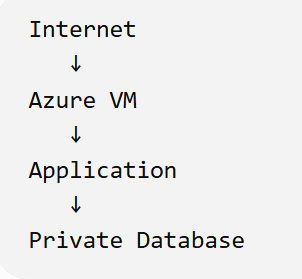
This introduced several important considerations:
MySQL port 3306
Network Security Groups
Database authentication
Private networking
Application-to-database connectivity
Database schema and data import
I used the MySQL client to connect to the database and import the required database structure and data.
This was an important transition from simply hosting a website to deploying a functioning application stack.
Troubleshooting Real Deployment Problems
The Azure projects were not simply a series of successful commands.
Several problems required investigation and remediation.
Nginx File Permissions
As mentioned earlier, Nginx initially could not access the React build because of Linux filesystem permissions.
Resolving the issue required understanding:
Directory permissions
Directory traversal
Ownership
The user running Nginx
The location of the application files
Node.js Port Conflict
The EpicBook backend was configured to listen on port 3001.
At one point, restarting the application produced an EADDRINUSE error because another process was already using that port.
I investigated which process was listening on the port, resolved the conflict, and restarted the application rather than making unnecessary changes to the application configuration.
Database SSL Connectivity
The Node.js backend also encountered an SSL connection problem because the required CA certificate bundle was unavailable.
After obtaining the appropriate certificate bundle and configuring the connection correctly, the backend successfully established an SSL connection to the database.
These experiences reinforced another important lesson:
When an application fails, identify the failing layer before changing the architecture or application code.
Moving to a Production-Style Three-Tier Architecture
The biggest architectural step in my Azure projects was deploying the Book Review App using a production-style three-tier architecture.
Instead of treating the application as one large deployment, I separated it into three logical tiers.
Presentation Tier
Responsible for the user-facing application.
Next.js frontend
Nginx
Public Load Balancer
Public subnets
Application Tier
Responsible for business logic and APIs.
Node.js
Express.js
Private application servers
Internal Load Balancer
Private application subnets
Data Tier
Responsible for persistent application data.
Azure Database for MySQL Private database networking Database subnet
The architecture can be represented as:
                     INTERNET
                        │
                        ▼
             ┌────────────────────┐
             │ Public Load        │
             │ Balancer           │
             └─────────┬──────────┘
                       │
                ┌──────▼──────┐
                │ Presentation│
                │ Tier        │
                │ Nginx/Next  │
                └──────┬──────┘
                       │
             ┌─────────▼─────────┐
             │ Internal Load     │
             │ Balancer          │
             └─────────┬─────────┘
                       │
                ┌──────▼──────┐
                │ Application  │
                │ Tier         │
                │ Node/Express │
                └──────┬──────┘
                       │
                ┌──────▼──────┐
                │ Data Tier    │
                │ MySQL        │
                └──────────────┘
Why Three-Tier Architecture Matters
The purpose of a three-tier architecture is not simply to make a cloud environment more complicated.
Each tier has a defined responsibility and network boundary.
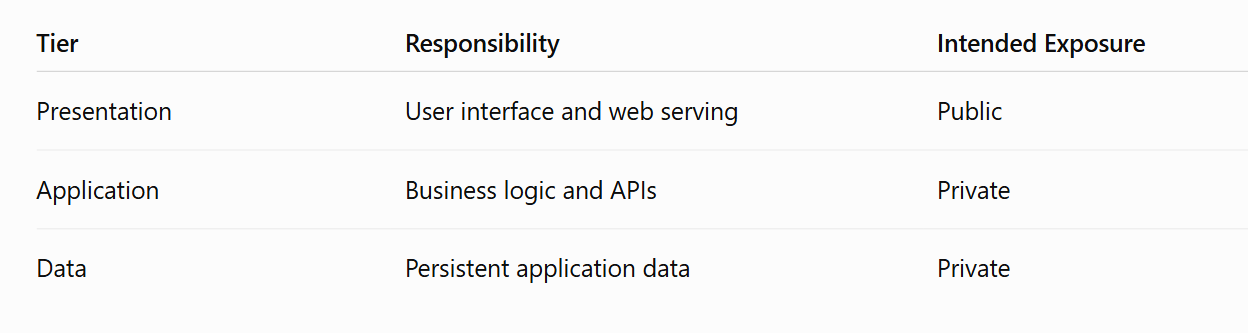
This separation creates a stronger foundation for:
Security
Scalability
Availability
Maintenance
Troubleshooting
Network access control
Most importantly, components that do not need direct Internet exposure should not be unnecessarily exposed.
For example, the database should communicate with the application tier without becoming a public entry point.
Load Balancing and Availability
The three-tier project also introduced me to Azure Load Balancing.
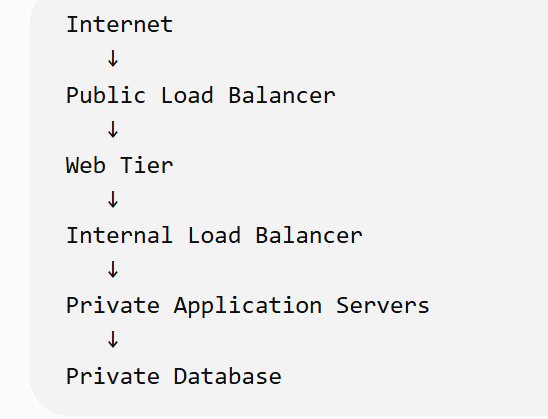
The public load balancer provided a controlled Internet-facing entry point, while the internal load balancer distributed requests across private application instances.
The traffic flow was:
This demonstrated an important production engineering principle:
When availability requirements call for redundancy, an application should not depend on a single application instance.
The architecture also reinforced the separation between Internet-facing infrastructure and internal application and database components.
From "Does It Work?" to "Is It Secure?"
After deploying and testing the applications, I moved to a different question:
The application works. But is it safe to leave running like this?
This became the focus of Assignment 7: AI-Assisted Azure Security Posture Audit.
The objective was to build a repeatable, read-only security audit using:
Azure CLI
Bash jq
Claude Code
Agentic AI
The audit focused on four security checks:
Network Security Group rules
Storage account public blob access
VM disk encryption status
Azure Database for MySQL public network access
Building a Repeatable Azure Security Audit
I created a dedicated audit workspace:
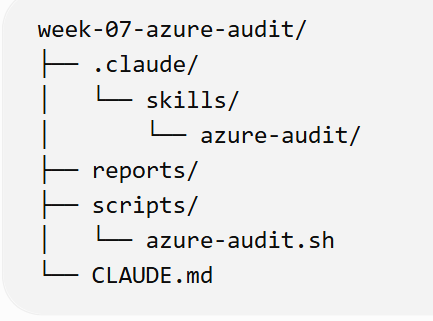
The Bash script collected configuration evidence from Azure and generated a structured security report.
Each check could produce:
[PASS]
[WARN]
[FAIL]
The script then calculated an overall status:
HEALTHY
WARN
FAIL
It also returned meaningful exit codes:
0 = HEALTHY
1 = WARN
2 = FAIL
This makes the audit suitable for repeatable execution and future automation.
Security Check: Network Security Groups
The first check looked for unrestricted inbound access to administrative ports:
SSH — 22
RDP — 3389
The audit looked for rules allowing sources such as:
0.0.0.0/0 * Internet
on those ports.
This matters because exposing administrative services to the entire Internet increases the attack surface.
Where possible, administrative access should be restricted to trusted source IP addresses or an appropriate management path.
Security Check: Storage Public Access
The second check examined whether public blob access was enabled on the Azure Storage Account.
If public blob access was enabled, the audit reported a finding.
The broader lesson was:
Public access should be intentional, not accidental.
If an application does not require public access to storage objects, that exposure should not simply be left enabled.
Security Check: VM Disk Encryption
The third check examined the VM's OS disk encryption configuration.
Importantly, the audit treated an inability to confirm the specific property as a warning, rather than automatically declaring the disk insecure.
This distinction matters because cloud platforms can provide encryption at rest through underlying managed-disk capabilities even when a particular property does not provide the complete security picture.
This taught me an important security automation lesson:
A security audit should distinguish between confirmed risk and incomplete evidence.
Security Check: MySQL Public Network Access
The fourth check examined whether the Azure Database for MySQL server had public network access enabled.
For the intended private database architecture, the desired state was:
Public Network Access: Disabled
If public network access was enabled, the audit reported a failure.
This reinforced the principle of minimizing unnecessary database exposure.
Turning the Audit into a Claude Code Skill
The next step was to turn the Bash audit into a reusable Claude Code skill.
The structure was:
.claude/ └── skills/ └── azure-audit/ └── SKILL.md
The skill could then be manually invoked with:
/azure-audit
The workflow was deliberately constrained:
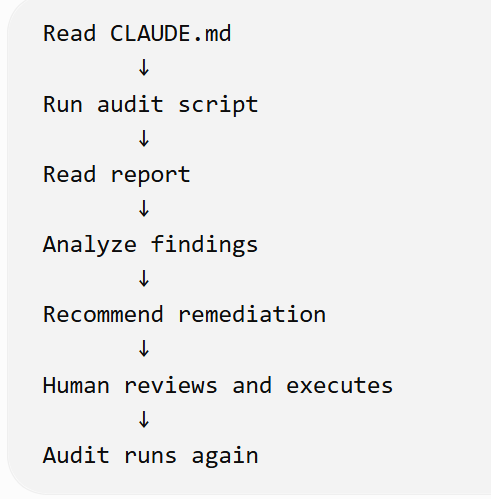
The skill was designed to remain read-only. Claude could analyze the evidence and recommend a remediation command, but it was not allowed to execute Azure resource modifications.
Human-in-the-Loop Agentic AI
This was one of the most valuable lessons from the security audit.
The workflow followed the Agentic AI pattern:
Gather
Bash and Azure CLI collected facts from the live Azure environment.
Analyze
Claude Code examined the report and identified potential security findings.
Human Act
I reviewed the recommendation and executed the appropriate remediation command myself.
Verify
I ran the audit again to confirm whether the security finding had actually been resolved.
Gather ↓ Analyze ↓ Human Act ↓ Verify ↺
The key principle was:
AI can assist with analysis and recommendations while the engineer remains responsible for infrastructure changes.
This approach provides useful AI assistance while maintaining human control over potentially impactful cloud operations.
Proving the Remediation Worked
The assignment required more than identifying a security issue.
I had to fix a real finding and prove that the fix worked.
The process was:
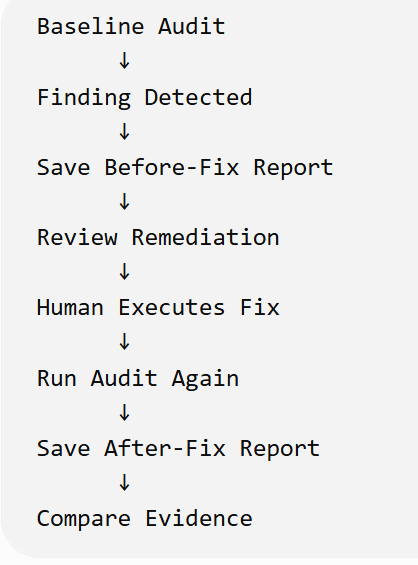
The important part was the verification step.
A successful remediation command does not automatically prove that the desired security state has been achieved.
The second audit provided evidence that the state had actually changed.
That is the difference between:
"I ran the fix."
and:
"I ran the fix and verified the result."
Key Lessons from My Azure DevOps Projects
Looking across these projects, several lessons stand out.
1. Application functionality is only one layer of success
An application loading successfully does not automatically mean the infrastructure is secure, scalable, or maintainable.
2. Architecture should minimise unnecessary exposure
Public-facing components should be separated from private application and database components where appropriate.
3. Troubleshooting should be evidence-driven
Nginx permission issues, Node.js port conflicts, SSL connectivity problems, and backend failures required investigation before remediation.
4. Automation makes security checks repeatable
A Bash script can turn manual checks into a consistent process that can be executed repeatedly.
5. AI needs clearly defined boundaries
Claude Code can provide valuable analysis and recommendations without being given unrestricted permission to modify cloud infrastructure.
6. Verification is part of remediation
A fix is not complete simply because a command executed successfully.
The resulting system state must be checked.
From Azure Projects to a DevOps Engineering Workflow
The most valuable outcome of these projects was seeing how individual technologies fit together:
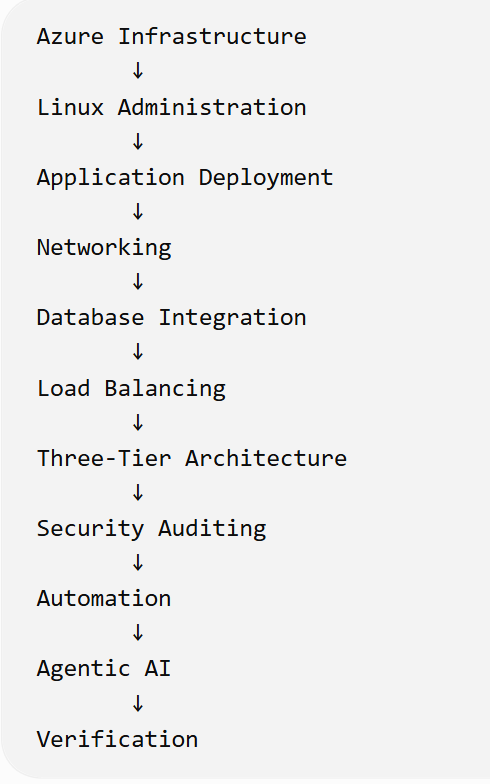
Each stage built on the previous one.
I was not simply learning how to provision resources in the Azure Portal.
I was learning how infrastructure, applications, networking, security, automation, troubleshooting, and AI-assisted engineering interact as one system.
Conclusion
This Azure journey has changed the way I think about cloud and DevOps engineering.
I started with individual Azure resources and application deployments.
I progressed to managing Ubuntu servers, configuring Nginx, deploying React and Node.js applications, connecting applications to MySQL, troubleshooting real infrastructure problems, and working with public and private network boundaries.
I then moved to a production-style three-tier architecture with load balancing and separation between the presentation, application, and data tiers.
Finally, I built a read-only Azure security posture audit using Bash and Azure CLI, connected it to Claude Code, and used a human-in-the-loop workflow to analyze findings, execute remediation, and verify the result.
The biggest lesson I am taking forward is:
A successful cloud deployment is not simply one that works. It should be appropriately secured, maintainable, testable, and verifiable with evidence.
That is the mindset I am continuing to develop as I build my career in Cloud and DevOps Engineering.
Technologies Used
Microsoft Azure
Azure Virtual Machines
Azure Virtual Networks
Subnets
Network Security Groups
Azure Load Balancer
Azure Storage
Azure Database for MySQL Flexible Server
Application & Linux
Ubuntu
Nginx
React
Next.js
Node.js
Express.js
MySQL
Linux administration
DevOps & Automation
Bash
Azure CLI
jq
Git/GitHub
Security auditing
Troubleshooting
Human-in-the-loop remediation
AI
Claude Code
Claude Code Skills
Agentic AI
Gather → Analyze → Human Act → Verify
Final Takeaways
These projects gave me hands-on exposure to a complete cloud engineering lifecycle:
Build → Deploy → Troubleshoot → Architect → Secure → Audit → Remediate → Verify
That progression is helping me move beyond simply learning cloud services toward thinking like a DevOps Engineer responsible for the reliability, security, and operational behavior of the systems I deploy.
P.S. This post is part of the DevOps Micro Internship (DMI) with Agentic AI — Cohort 3 — by Pravin Mishra. My graded progress is public · Start your DevOps journey
Interested in starting your own DevOps journey? Learn more about the DevOps Micro Internship
About the author
- Hi, I'm Kingsley, a Cloud & DevOps Engineer focused on building practical skills in AWS, Azure, infrastructure automation, and modern DevOps practices. I work on hands-on projects involving AWS, Azure, Linux, Git, Docker, Terraform, Bash, and CI/CD, using these technologies to build, automate, deploy, monitor, and troubleshoot cloud infrastructure. This blog documents my technical projects, engineering challenges, solutions, and lessons learned. I share practical implementations and real-world problem-solving experiences across Cloud and DevOps, with the goal of continuously improving and contributing to reliable, automated infrastructure.
Comments
Join the discussionNo comments yet. Be the first to comment.